Showing posts with label Microsoft Virtual Academy (MVA). Show all posts

Tuesday, April 12, 2016

Hybrid IT Management course from Microsoft Virtual Academy (MVA)

There is a series on Microsoft Virtual Academy (MVA) to talk about Hybrid IT Management. There are 2 parts with 20 sessions in it. These are the following will be covered in Part 1 and Part 2.

Part 1
1. Introducing Hybrid IT Management
2. Getting Started
3. Deployment Options
4. Solutions
5. Logs and Near Real-Time Performance Data Collection
6. Search and Customizations
7. Security Analytics
8. Recommended Resources and Next Steps

Part 2
1. Introducing Hybrid IT Management
2. Introducing Azure Backup
3. IaaS Backup
4. Hybrid Cloud Backup with Microsoft Azure Backup Server
5. Integrating System Center Data Protection Manager and Azure Backup
6. System Center Data Protection Manager Overview
7. Introduction to Azure Site Recovery
8. VMware and Physical to Azure
9. Hyper-V to Azure
10. Site-to-Site DR with Azure Site Recovery and Hyper-V Replica
11. Site-to-Site DR with Azure Site Recovery and SAN Replication
12. Site-to-Site DR for VMware with Azure Site Recovery
13. Workload Support and Capacity Planning
14. Summary and Resources

Please go to the following web sites to watch these series.


This posting is provided “AS IS” with no warranties, and confers no rights!

Saturday, March 26, 2016

Reschedule - Deploying Windows 10: Automating Deploying by Using System Center Configuration Manager from Microsoft Virtual Academy

This live event is rescheduled on Microsoft Virtual Academy on 13-Apr-2016 to talk about deploying Windows 10 by System Center Configuration Manager (SCCM). This event is hosted by Aaron Czechowski, Senior Program Manager, Microsoft Enterprise Client Management, and Wally Mead, Principal Program Manager, Cireson. Don't miss it If you plan to deploy Windows 10 to your environment by SCCM.


E-book related to this event.

This posting is provided “AS IS” with no warranties, and confers no rights!

Thursday, March 17, 2016

Microsoft IPv6 from Microsoft Virtual Academy

Microsoft Virtual Academy (MVA) will be held a live event on 29-Mar, 2016 to talk about IPv6. This live event will be held by Ed Horley, Groupware Technology Practice Manager for Cloud Solutions and the Practice Lead for IPv6, and Joe Davies, Microsoft Senior Content Developer. Registry this live event and find out how to apply IPv6 to Microsoft environment.


This posting is provided “AS IS” with no warranties, and confers no rights!
Thursday, October 22, 2015

Windows Server 2016: Virtualization Deep Dive on Microsoft Virtual Academy (MVA) course

There is a new course on Microsoft Virtual Academy (MVA) to talk about Virtualization on Windows Server 2016. Windows Server 2016: Virtualization Deep Dive is hold by Matt McSpirit, Technical Evangelist, and Ben Armstrong, Principal Program Manager Lead, Hyper-V. If you are a big fan of Hyper-V, you must know Ben Armstrong. They talked about Hyper-V on Nano Server, Containers and other new features on Windows Server 2016 Virtualization. Don't miss this MVA course to learn what's new in Windows Server 2016 Virtualization.

This posting is provided “AS IS” with no warranties, and confers no rights!

Saturday, September 26, 2015

Security in the Enterprise on Microsoft Virtual Academy (MVA) course

There is a new course on Microsoft Virtual Academy (MVA) to talk about security. Security in the Enterprise is hold by Simon May, Infrastructure Technical Evangelist, and Erdal Ozkaya, Microsoft MVP in Windows IT Pro. It a entry level MVA course to let you understand the concept and get some tips to protect your enterprise. It's worth watching it.

This posting is provided “AS IS” with no warranties, and confers no rights!

Wednesday, September 23, 2015

A new Microsoft Virtual Academy (MVA) for Nano Server

There is a new Microsoft Virtual Academy (MVA) course, A Deep Dive into Nano Server to talk about how to install, manage and troubleshooting Nano Server. This course is held by Matt McSpirit, Technical Evangelist, and Andrew Mason, Principal PM Manager, Windows Server Platform and tools. Don't miss this course.

This posting is provided “AS IS” with no warranties, and confers no rights!

Thursday, April 16, 2015

3 new Microsoft Virtual Academy (MVA) courses related to Microsoft Azure and Windows Azure Pack


Windows Azure Pack: Express Installation Walkthrough is hosted by Yung Chou, Microsoft Senior Technical Evangelist, and Shriram Natatajan, Microsoft Program Manager. They're going to talk about a overview of the Windows Azure Pack and how to set up for evaluation and testing environment.

All About Microsoft Azure Operational Insights is hosted by Laura Cruz, Microsoft Program Manager, and Matt McSpirit, Microsoft Senior Technical Product Manager. They're going to talk about how to deploy Microsoft Azure Operational Insights and use it to analyse your data of your environment.

Windows Azure Pack: Partner Solutions is hosted by many Microsoft Partners. They're going to talk about how their products to integrate with Windows Azure Pack and then provide additional services on your private cloud.

If you're interested in one of these, please go the Microsoft Virtual Academy (MVA) to watch it. 

This posting is provided “AS IS” with no warranties, and confers no rights!

Friday, April 3, 2015

PowerShell tips for beginners

One of web sites for learning PowerShell that I'd like to share is Hey, Scripting Guy! Blog. Ed Wilson, Microsoft Scripting Guy, shares cmldets or answers questions in this web site. If you are interested in PowerShell, you can read Hey, Scripting Guy! Blog to learn PowerShell.

Except this web site, there are 2 Microsoft Virtual Academy (MVA) courses, Getting Started with PowerShell 3.0 Jump Start and Advanced Tools & Scripting with PowerShell 3.0 Jump Start to talked about PowerShell. These MVA courses were hosted by Jeffrey Snover, Microsoft Distinguished Engineer, and Jason Helmick, an author a Pluralsight and PowerShell MVP. Please take some times to watch these series and learn the basic PowerShell skills.

I hope you enjoy learning and playing with PowerShell.

This posting is provided “AS IS” with no warranties, and confers no rights!

Wednesday, February 4, 2015

Learn Windows Server 2012 R2 Failover Clustering from a Microsoft Virtual Academy (MVA) course

There is a new recorded Microsoft Virtual Academy (MVA) course is talked about Windows Server 2012 R2 Failover Clustering. The course is hosted by Symon Perriman, 5 nine software Vice President of Business Development, and Elden Christensen, Microsoft Principal Program Manager Lead. This course was given an introduction of Failover Clustering and talk Cluster deployment, networking, storage and so on. Let's watch this MVA to learn some best practices.


This posting is provided “AS IS” with no warranties, and confers no rights!

Friday, January 30, 2015

2 new live events related to Desired State Configuration (DSC) on Microsoft Virtual Academy (MVA)

There are 2 new live events related to Desired State Configuration (DSC) which are Getting Started with PowerShell Desired State Configuration and Advanced PowerShell Desired State Configuration (DSC) and Custom Resources on Microsoft Virtual Academy (MVA). These events are hosted by Jeffrey Snover, Microsoft Distinguished Engineer, and Jason Helmick, an author a Pluralsight and PowerShell MVP. Getting Started with PowerShell Desired State Configuration will be held on 25-Feb-2015 and Advanced PowerShell Desired State Configuration (DSC) and Custom Resources will be held on 26-Feb-2015. If you'd like to deep dive on Desired State Configuration (DSC), don't miss both events. Register it!

This posting is provided “AS IS” with no warranties, and confers no rights!

Saturday, January 10, 2015

A new Microsoft Virtual Academy (MVA) course about Azure Multi-Factor Authentication

There is a new Microsoft Virtual Academy (MVA) which is talked about Azure Multi-Factor Authentication. In this course, Mike Ihlenfeldt, Microsoft Support Escalation Engineer - Azure MFA Server, and Stan Orme, Microsoft Support Escalation Engineer - Azure MFA Server, give an introduction of Azure Multi-Factor Authentication. 

Then, They covered the following sessions.

1. How to create an Microsoft Azure subscription for Azure Multi-Factor Authentication 
2. The management portal of Azure Multi-Factor Authentication and show some options
3. Download and install Multi-Factor Authentication server on a Windows Server and show some options of  Multi-Factor Authentication server
4. How to migrate phone factor server to Multi-Factor Authentication server

If you would like to get general overview of Azure Multi-Factor Authentication, please watch this MVA course.


This posting is provided “AS IS” with no warranties, and confers no rights!

Wednesday, December 31, 2014

Using Microsoft solutions to maintain Business Continuity

There is a new Microsoft Virtual Academy (MVA) course, Microsoft Business Continuity, which is talked about maintaining Business Continuity by Microsoft solutions. This course was hosted by Matt McSpirit, Senior Technical Product Manager and Symon Perriman, Senior Technical Evangelist. It included 4 modules in this course which are High Availability, Data Protection, Site Recovery and Site Recovery for Heterogeneous Environments. It covered some Microsoft products and features which are based on Windows Server 2012 R2, System Center 2012 R2 and Microsoft Azure. like Windows Failover Clustering, System Center Data Protection Manager (DPM), Microsoft Azure Site Recovery and Image Scout. Matt and Symon did some demonstrations to use these above products or features to maintain Business Continuity for Hyper-V and VMware environment.

If you are interested, please watch this MVA course.

This posting is provided “AS IS” with no warranties, and confers no rights!

Sunday, December 7, 2014

Review a MVA course (Using PowerShell for Active Directory) Module 4

Module 4
It's a difficult module in this series, Using PowerShell for Active Directory. In this module, Jason and Ashley talked about forensic investigations and lockout in Active Directory. They used many PowerShell to do demonstrations.

First of all, Ashley used .Net code, [System.Security.Principal.SecurityIdentifier] to work with PowerShell to get Enterprise Admins, Domain Admins. The scripts are the following:

$SID_GROUP_EA = [System.Security.Principal.SecurityIdentifier]"$((Get-ADDomain -Identity (Get-ADForest).Name).DomainSID)-519"

$SID_GROUP_DA = [System.Security.Principal.SecurityIdentifier]"$((Get-ADDomain).DomainSID)-512"

$SID_GROUP_AD = [System.Security.Principal.SecurityIdentifier]'S-1-5-32-544'

$SID_USER_AD  = [System.Security.Principal.SecurityIdentifier]"$((Get-ADDomain).DomainSID)-500"

Get-ADGroup $SID_GROUP_EA -Properties * -Server (Get-ADForest).Name
Get-ADGroup $SID_GROUP_DA -Properties *
Get-ADGroup $SID_GROUP_AD -Properties *
Get-ADUser  $SID_USER_AD  -Properties *

Then, they talked about "Get-ADReplicationAttributeMetadata" to get metadata like last change from which domain controller, version, attribute name and so on. They explained the usage of some attribute names. "Get-ADReplicationAttributeMetadata" with the parameter, -ShowAllLinkedValues" can get the group history of user accounts which are joined.

Get-ADUser $userobj.DistinguishedName -Properties memberOf |
 Select-Object -ExpandProperty memberOf |
 ForEach-Object {
    Get-ADReplicationAttributeMetadata $_ -Server localhost -ShowAllLinkedValues
      Where-Object {$_.AttributeName -eq 'member' -and 
      $_.AttributeValue -eq $userobj.DistinguishedName} |
      Select-Object FirstOriginatingCreateTime, Object, AttributeValue
    } | Sort-Object FirstOriginatingCreateTime -Descending | Out-GridView

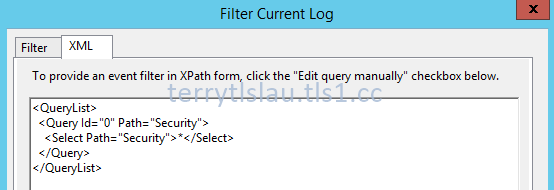
After that, they talked about XML view of Event Logs. We can use "Filter Current Log" option to get the custom XML code of event log and then paste it to PowerShell to write our own scripts to get event from all domain controllers.


In Windows Server 2012 or later, we can perform "Search-AdAccount -LockedOut" to find which accounts were locked.

Finally, they performed a lot of scripts to check permissions of Active Directory.

Remark: All PowerShell scripts were written by Ashley McGlone. You can download the scripts from the following web site.


For more information:


Related posts:


This posting is provided “AS IS” with no warranties, and confers no rights!

Review a MVA course (Using PowerShell for Active Directory) Module 3

As previous post, Review a MVA course (Using PowerShell for Active Directory) Module 1 and 2, I made some notes for Module 1 and 2 of Using PowerShell for Active Directory when I was watching this MVA course. I'm going to watch and make some notes for Module 3.

Module 3
In this module, Jason and Ashley started to talk about query information from Active Directory. Basically, we can use 3 types of filter of Get-ADUser which are filter, Identity and Ldapfilter to query Ad user. The interesting thing is we can combine commands and PowerShell cmdlets to get the output like "Get-ADUser -Identity (whoami /user /fo csv | ConvertFrom-Csv | Select-Object -ExpandProperty SID)" to get the SID information of the current user.

Then, they talked about the scope for Active Directory query. "Get-ADRootDSE", "Get-ADDomain" and "Get-ADForest" are the method to limit the scope because we can use a property of these results to let us query Active Directory easily.

After that, they did demonstrations to Active Directory information by performing "Get-ADRootDSE", "Get-ADDomain" and "Get-ADForest".

Finally, they did a demonstration to find a nested member of a group by performing Get-AD User -Filter "memberof  -RecursiveMatch '$((Get-ADGroup "Domain Admins").DistinguishedName)'" -SearchBase $((Get-ADUser Guest).DistinguishedName).

Remark: All PowerShell scripts were written by Ashley McGlone. You can download the scripts from the following web site.

Microsoft Virtual Academy: Using PowerShell fort Active Directory

For more information:
Using PowerShell for Active Directory

Goatee PFE
This posting is provided “AS IS” with no warranties, and confers no rights!

Thursday, December 4, 2014

Review a MVA course (Using PowerShell for Active Directory) Module 1 and 2

I missed one great MVA course which is Using PowerShell for Active Directory because I was joining TechEd Europe at that time. Recently, I started to watch this MVA course. This course was hosted by Jason Helmick, Concentrated Technology Senior Technologist, and Ashley McGlone, Microsoft Senior Premier Field Engineer. I tried to make some notes for revision.

Module 1
Using Remote Server Administration Tools (RSAT) to manage Active Directory, the main disadvantage is we can't install the latest version RSAT on previous OS version. For an example, we can install RSAT for Windows 8.1 on a Windows 7 workstation. Using PowerShell, we can use "New-PSSession" and "Import-PSSession" to import PowerShell module from any version of Operating Systems to the current computer. Then, we can use the latest cmdlets to manage Active Directory.

The second thing, we can Active Directory Administrative Center to check the PowerShell History of Active Directory. It's easy for us to get some hints to write our own scripts.

The last thing, we can use PowerShell to browse the Active Directory like cd ad: partition.

Reference:
How To Use The 2012 Active Directory PowerShell Cmdlets From Windows 7

Module 2
Jason and Ashley talked about creating, updating and deleting users and groups in Active Directory by PowerShell. 

By default, Get-ADUser dones't get all properties from user accounts. We need to add "-Property *" to get all properties from user accounts. Then, make "New-ADUser" to a variable. It's easy for us to modify properties of user accounts because we don't need to enter the full distinguished name. 

After that, the user account was created by "New-ADUser" but it isn't enabled if you don't assign a password for the user account. To enter a password for the user account, we need to create a variable to store the password from "Read-Host" cmdlet with a parameter, "-AsSecureString" or enter the following cmdlet "New-AdUser <User Name> -Enabled $True -AccountPassword $(ConvertTo-SecureString <password> -AsPlainText -Force)" to create a user account.

Later, they talked to use "Import-CSV" with pipeline and then modify the title name of CSV by performing "Select-Object @{Name=<Property name>;expression={$_.<title name from CSV}}". This is common method in PowerShell to change the output name. To learn more, please watch Getting Started with PowerShell 3.0 Jump Start. Use "Out-GridView" to verify the data before creating user accounts.

To talk about New-ADGroup, Ashley gave a tip to store (Get-ADDomain).distinguishedname to a variable. It's really useful for us to create a new AD group because we don't need to enter full distinguished name. We just enter the variable.

We can add a non-common Active Directory attribute like carLicense for AD user accounts by entering -OtherAttributes @{carLicense='attribute'>  on New-ADUser or performing Set-ADUser -Add @{carLicense='attribute'> to add a new attribute for user accounts.

Then, we can use "Set-ADComputer <Computer Name> -ServicePrincipalNames @{Add='HTTP/FQDN NAME}" to add a new service principal name. In previous version of Active Directory domain, we can use Setspn to to this.

Finally, they talked about remove member of a group and delete AD Users. For cross domains scenario, you may need to use Set-ADObject to delete a group member with cross domains of a universal group. To delete AD User, we can use "Get-ADUsers -Filter Remove-ADUser" to delete Ad users.

Remark: All PowerShell scripts were written by Ashley McGlone. You can download the scripts from the following web site.

Microsoft Virtual Academy: Using PowerShell for Active Directory 

For more information:
Using PowerShell for Active Directory

Goatee PFE

Related posts:
Review a MVA course (Using PowerShell for Active Directory) Module 3

Review a MVA course (Using PowerShell for Active Directory) Module 4

This posting is provided “AS IS” with no warranties, and confers no rights!

Sunday, November 9, 2014

2 new MVA live events for IT pros on 20-Nov-2014 and 01-04-Dec-2014

There are 2 new coming events for IT Pros on Microsoft Virtual Academy. One is Windows 10 Technical Preview Fundamentals for IT Pros. The Windows 10 event will talk about the security, device management, multifactor authentication and so on. If you joined some sessions or watched keynote of TechEd Europe 2014, Microsoft  emphasized multifactor authentication and security on Windows 10. Let's join this event to get more information.
 
Another one is Azure IaaS for IT Pros. Mark Russinovich, Microsoft Chief Technology Officer, will talk about Azure IaaS. Microsoft said that Hybrid cloud is ultimate cloud solution. Let's join this event to get the answer and deep dive into Microsoft Azure Hybrid cloud. Furthermore, we can get 50 percent off of the exam, 70-533: Implementing Microsoft Azure Infrastructure Solutions, if we join this live event.
 
If you're interested in Windows 10 Technical Preview and Azure IaaS, don't miss it.
 
This posting is provided “AS IS” with no warranties, and confers no rights!

Friday, September 26, 2014

Using PowerShell for Active Directory on Microsoft Virtual Academy (MVA)

A new Microsoft Virtual Academy (MVA) will talk about using PowerShell for Active Directory. Let's learn PowerShell technique to manage your Active Directory environment by PowerShell. This course is hosted by Jason Helmick, PowerShell MVP, and Ashley McGlone, Microsoft Senior Premier Filed Engineer.
 
If you are interested in PowerShell or managing Active Directory. Don't miss it and register to join this live event at the following web site. The event will be started on 29-Oct-2014 8:00 am - 12:00pm PDT.
 
 
This posting is provided “AS IS” with no warranties, and confers no rights!

Sunday, September 14, 2014

VMware to Hyper-V Migration Microsoft Virtual Academy course

A new Microsoft Virtual Academy course, VMware to Hyper-V Migration, is available on Microsoft Virtual Academy website. This course is hosted by Matt McSpirit, Microsoft Senior Technical Product Marketing Manager. Matt talked about solutions which are provided by Microsoft to migrate virtual machines from VMware to Hyper-V platform and then he gave demonstrations of these tools. After that, he invited other partners to talk and give demonstrations of their tools to migrate virtual machines from VMware to Hyper-V platform.

If you are looking for solutions to migrate virtual machines from VMware to Hyper-V platform, don't miss this course.

VMware to Hyper-V Migration
 
This posting is provided “AS IS” with no warranties, and confers no rights!

Tuesday, August 26, 2014

Updating your knowledge of Microsoft Licensing 2014

There are 2 courses to talk about the latest licensing schema of Microsoft on Microsoft Virtual Academy. If you are interested in Microsoft licensing, please watch Licensing Programs' Fundamentals and Licensing Windows Server 2012 R2.

This posting is provided “AS IS” with no warranties, and confers no rights!

Wednesday, June 25, 2014

2 new live events related to Windows Azure Pack and Windows Server migration on Microsoft MVA

There are 2 new live events which are "Windows Azure Pack: Infrastructure as a Service Jump Start" and "Migrating Legacy Windows Server to 2012 R2 and Microsoft Azure" on Microsoft Virtual Academy (MVA). "Windows Azure Pack: Infrastructure as a Service Jump Start" will be performed at 9:00am - 1:00pm (PDT) of 16-17-July-2014 and "Migrating Legacy Windows Server to 2012 R2 and Microsoft Azure" will be performed at 9:00am - 1:00pm (PDT) of 24-Jul-2014. 

If you are interested in these events, please go the following web sites to register it. All events on MVA are free.


This posting is provided “AS IS” with no warranties, and confers no rights!